
Virgin Voyages
Virgin VoyagesTravel & Local
4.8405.00 Reviews
- Version
- 1.12.0
- Installs
- 100.00K
- Age Rating
- Everyone
Screenshots
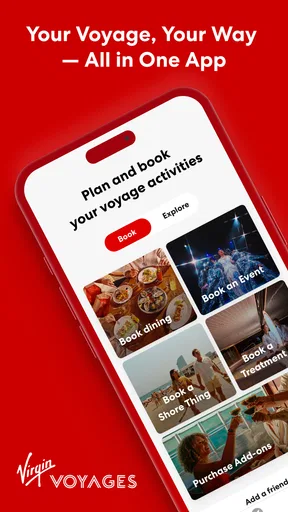

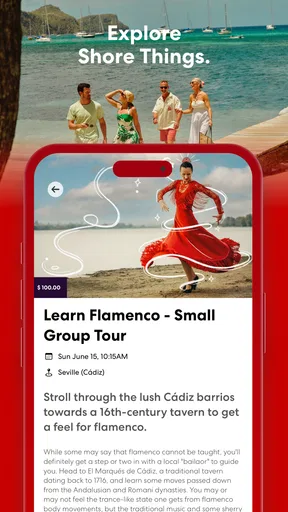
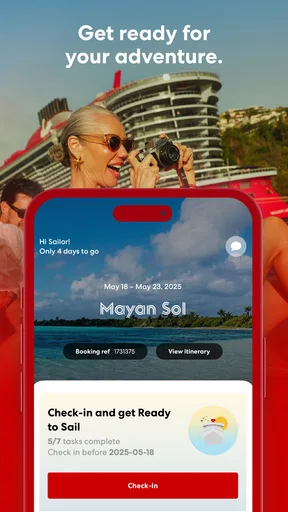
Our Review of Virgin Voyages
 Analysis by Appyee
I approached Virgin Voyages as the kind of travel app you open before a cruise, then keep nearby while the ship becomes your temporary neighborhood. It is a free Travel & Local app from Virgin Voyages, aimed at turning cruise planning and onboard decisions into one mobile routine. My overall impression is positive: it feels more useful when you treat it as a practical trip companion rather than as a replacement for every travel tool on your phone.
The app currently carries a 4.8 average from around 8,400 ratings, with more than 100,000 installs. Those figures suggest that it is reaching the audience it was built for, but they do not remove the need to judge it by your own travel style. A cruise app can be excellent for someone who wants plans, reminders, and ship-related information close at hand, while feeling unnecessary to a traveler who prefers paper schedules, a browser, or spontaneous decisions.
How the app fits into a Virgin Voyages trip
The most convincing part of the experience is the way it brings the trip into one place. Instead of switching between general map apps, email searches, browser tabs, and notes, I would use this app as my cruise-specific reference point. That distinction matters. It is not trying to be a universal city guide, and I would not expect it to replace a dedicated navigation app when exploring a port.
Before departure, the useful mindset is to use it as a preparation layer. I can imagine checking the voyage information, looking over available plans, and getting familiar with the rhythm of the trip before arriving. That early look reduces the usual first-day scramble, especially for travelers who want to know what decisions need attention before they step aboard.
Once the cruise is underway, the app makes more sense as a daily companion. A ship day can involve meals, entertainment, activities, port timing, and last-minute changes. Keeping those details inside the cruise app is more convenient than relying on memory. The real value is reducing small decisions and searches during a busy day, not simply putting a digital brochure on a phone.
I also like the idea of opening it with a specific question rather than browsing aimlessly. What do I need to do before boarding? What is relevant today? What should I check before leaving the ship? This habit makes a travel app feel faster and less cluttered, particularly when the onboard schedule is fuller than expected.
What the recent release tells me
The current version is 1.12.0, and the app was released on August 14, 2025. That gives the product a relatively current feel in the context of this review, but I would separate that fact from assumptions about what may arrive next. A version number shows that the app is being maintained as a product; it does not automatically promise a particular feature or a specific future update.
For existing users, a newer release can be valuable even when the visible interface looks familiar. Travel apps have to cope with changing itineraries, busy periods, and users who need information quickly. I would therefore judge this version less by flashy changes and more by whether the everyday flow feels dependable: opening the app, finding the relevant trip information, and moving on without unnecessary steps.
That is also why I would not install it only on the morning of departure. A cruise app earns its place when it has already become familiar. Spending a few minutes with the current version at home lets me learn where important information lives and notice whether the app behaves comfortably on my phone. It is a small preparation step, but it avoids learning the interface while standing in a terminal or trying to make a time-sensitive decision.
The minimum operating system is Android 9, which keeps the app accessible to many phones that are not brand new. That is helpful for travelers who reserve a newer device for photography but still depend on an older everyday handset. Even so, I would update the operating system where possible and make sure the phone has enough battery for travel tasks. Compatibility alone does not guarantee a smooth trip if the device is already slow or nearly full.
A realistic day with the app
Imagine arriving aboard after a long journey. I would first use the app to orient myself instead of trying to remember details from pre-trip messages. Later, when deciding how to spend the afternoon, I could consult the cruise information from the same place rather than searching through unrelated apps. Before heading out for the evening, I would check again so that a change in plan does not catch me by surprise.
The important workflow here is not one dramatic feature. It is the repeated cycle of check, decide, and return. That makes the app particularly suitable for people who like a loose plan but still want room for spontaneity. I can choose a broad direction for the day, then revisit the app when I am ready to make the next decision.
A second useful habit is checking information at natural transition points: before leaving the cabin, before going ashore, and before settling into an evening activity. This is more practical than constantly staring at the app. It also gives the phone a supporting role, allowing the cruise experience itself to remain the focus.
For a group trip, I would use the app as a shared reference rather than assuming everybody will follow the same schedule. Friends or family members can make different choices, so the app is most useful when it helps each person confirm the plan independently. That can reduce repeated questions, although it cannot replace agreeing on a meeting point when people separate.
Where it beats the usual alternatives
The usual alternative is a mixture of email, screenshots, web pages, notes, and a general travel app. That combination can work, but it scatters information across places that were not designed to cooperate. A general travel app may be better for flights, hotels, restaurant research, and city maps, yet it will not be as naturally focused on the Virgin Voyages portion of the trip.
I would keep a general maps app alongside this one for port exploration. Maps are better for walking routes, local businesses, and offline orientation in an unfamiliar city. This app has a different job: keeping the cruise-specific experience organized. Using both is more sensible than forcing either one to handle everything.
Email remains useful for confirmations and records, especially before departure. However, searching an inbox while traveling is slower than opening a dedicated app when I already know I need cruise information. The trade-off is that a dedicated app can feel narrow once I leave the ship. That is not a flaw so much as a reminder to use the right tool for each part of the journey.
Paper schedules and printed notes have one advantage: they do not depend on a charged phone. I would still bring a simple backup note for essential details, particularly on a long travel day. The app is more flexible when plans move, but a paper fallback is reassuring when battery, connectivity, or device problems enter the picture.
Who will get the most from it
I think the strongest audience is a Virgin Voyages traveler who wants one cruise-focused place to consult before and during the sailing. First-time cruisers may appreciate the sense of orientation, while experienced travelers can use it to reduce repetitive checking. It also suits people who dislike carrying printed material or keeping several screenshots organized.
It should appeal to travelers who enjoy making decisions as the day develops. The app can support a flexible plan without requiring every detail to be written down in advance. That is a better fit for me than an approach where the entire holiday is locked into a rigid spreadsheet.
It may be especially helpful for anyone coordinating a small group. Each traveler can check the same cruise-related information, and that shared reference is easier than forwarding every update manually. Still, I would not assume the app solves all group communication. A clear message or agreed meeting place remains important when people split up.
The app is less compelling for someone who is not taking a Virgin Voyages cruise. Its value is tied to that ecosystem, so a general travel planner is the more sensible download for independent travel, road trips, or city breaks. I would also hesitate to recommend it as the only travel app for a trip with several airlines, hotels, and destinations.
Small habits that make it more useful
My first tip is to explore it before the trip, not just when something goes wrong. Familiarity changes the experience from searching under pressure to checking with purpose. I would look through the main areas, identify where the most important trip information appears, and then close the app. That short rehearsal is more valuable than repeatedly browsing without a plan.
My second tip is to use a transition-check routine. Checking before leaving the ship or beginning an evening plan is more reliable than assuming an earlier look is still current. Travel days change quickly, and a deliberate pause helps me catch information that matters to the next part of the day.
Third, I would avoid treating the app as a complete backup system. Keep essential confirmations available in another form, carry a charged phone, and use a general map tool for destinations ashore. This layered approach is not a criticism of the app; it is simply good travel practice. A cruise companion works best when it handles its specialist role while other tools cover broader needs.
Fourth, I would give the app a place on the first screen or in a clearly labeled travel folder during the trip. That sounds minor, but speed matters when I am moving through a terminal, preparing to leave the ship, or deciding what to do next. The fewer taps between a question and its answer, the more likely I am to use it instead of reverting to scattered notes.
Where the experience can still be frustrating
The biggest limitation is the app’s narrow purpose. It is not a substitute for a complete travel organizer, and travelers who want one tool for flights, hotels, local transport, maps, and reservations will still need other apps. That may make the overall phone setup feel busier rather than simpler.
There is also a psychological cost to depending on a phone throughout a holiday. Some people want to disconnect, and a digital companion can encourage unnecessary checking. I would use it at useful moments instead of turning it into a constant notification source. The best experience comes from consulting it, making a decision, and putting the phone away.
Older devices may also affect the experience even when they meet the Android 9 requirement. Storage pressure, low battery health, or a crowded background workload can make any travel app feel slower. I would prepare the phone before sailing by removing unneeded downloads, charging it fully, and closing the apps I do not need. Those steps are practical, but they matter more on a trip than they do at home.
Another trade-off is that a dedicated cruise app depends on the traveler remembering to use it. If the people in a group never open it, shared information remains fragmented. I would introduce it as the common reference point before departure and agree that everyone checks it at the same transition points. Without that habit, its organizational advantage is easy to lose.
What I would watch in future use
I would watch how the app continues to evolve beyond version 1.12.0, especially in the areas that matter during a real sailing: clarity, speed, and the ease of finding today’s relevant information. I would value improvements that remove friction more than decorative changes. A travel app succeeds when it helps me act quickly without making me study the interface.
I would also pay attention to how well it supports the boundary between preparation and onboard use. The best version of this kind of app should feel useful before departure without becoming overwhelming, then remain easy to consult when the ship is busy. Those are different contexts, and a design that works in one may not automatically work in the other.
My expectations would stay measured. A current release is encouraging, but I would not assume that every future update will transform the experience. Instead, I would look for steady refinement: fewer confusing steps, better prioritization of timely information, and a smoother return to the details I use most.
Virgin Voyages is free and rated for Everyone, so the barrier to trying it is low. The sensible test is to install it before the cruise, explore it calmly, and decide whether it fits the way you organize travel. If it becomes the place I naturally check for cruise-specific decisions, it has earned its space. If I only need a map and a few saved confirmations, a broader travel setup may be enough.
My final view is that this is a focused companion rather than a universal travel solution. I would recommend it to Virgin Voyages passengers who want less scattered planning and a convenient way to revisit cruise information throughout the day. I would skip it as a primary tool for unrelated travel, and I would never rely on it alone for every essential detail. Used alongside a maps app, a backup of important confirmations, and sensible battery preparation, it can make the cruise feel easier to navigate without taking over the trip.
Verdict
Strengths of Virgin Voyages
- Adults-only cruises create a relaxed, grown-up atmosphere.
- Modern ships offer stylish design and plenty of social spaces.
- The app makes checking schedules, bookings, and onboard plans convenient.
- Many dining venues are included instead of relying on one main buffet.
- Entertainment feels fresh, with unusual shows and lively nightlife.
Limitations of Virgin Voyages
- The adults-only policy excludes families traveling with children.
- Cruise fares can rise quickly with Wi-Fi, drinks, and premium extras.
- Some onboard activities and shows require advance reservations.
- The app may feel less useful when ship connectivity is unreliable.
- Virgin Voyages has fewer ships and routes than major cruise brands.
Similar Picks in This Category
View All
Google Maps
Google LLC3.4

Google Maps Go
Google LLC4.1

Booking.com: Hotels & Travel
Booking.com Hotels & Vacation Rentals4.8

Google Earth
Google LLC3.8

Skyscanner Flights Hotels Cars
Skyscanner Ltd4.8

trivago: Compare hotel prices
trivago N.V.4.4
Frequently Asked Questions
What is the Virgin Voyages app used for?
The Virgin Voyages app is the main digital companion for planning and managing a Virgin Voyages cruise. After signing in, you can browse itineraries, review your voyage details, complete check-in steps, reserve restaurants and entertainment, explore shore excursions, and receive important updates. It is especially useful before departure, although some features become more relevant once you are onboard.
Can I use the Virgin Voyages app before booking a cruise?
Yes, you can generally use the app to explore Virgin Voyages offerings, destinations, ships, and available sailing information before making a reservation. However, the most useful planning tools are available after you link a booking or sign in with a voyage account. If you are traveling with others, make sure the correct reservation is connected so that dining, activities, and guest information appear accurately.
Do I need internet access to use the app on the ship?
An internet connection is normally required to download the app, sign in, synchronize booking information, and receive current updates. Once onboard, access may depend on the ship’s Wi-Fi service and your voyage package. Some previously loaded information may remain visible without a connection, but you should not assume that every feature works offline. It is best to open and update the app before sailing.
Can I book restaurants, entertainment, and shore excursions through the app?
The app is designed to help guests manage many onboard and pre-cruise reservations, including dining venues, shows, wellness services, and shore experiences. Availability can change quickly, particularly on popular sailings, so checking the app soon after booking is worthwhile. Some activities may have age requirements, fees, limited capacity, or specific cancellation rules that you should review before confirming.
Is the Virgin Voyages app free to download and use?
Downloading the Virgin Voyages app is generally free, but using the app does not mean that all cruise-related services are free. Your cruise fare, Wi-Fi access, excursions, specialty services, drinks, and other purchases may involve separate charges. The app may also display optional upgrades or onboard spending choices. Always review the price and payment details shown before completing a reservation or purchase.
